


How do I edit a photo in Claude?
Connect Vercanto to Claude, give it the photo and say what should change. Claude calls generate_image with your photo as the input, and an editing model changes what you asked for and keeps the rest. One edit costs 12 credits ($0.12) on Nano Banana 2.
A real example
 The photo
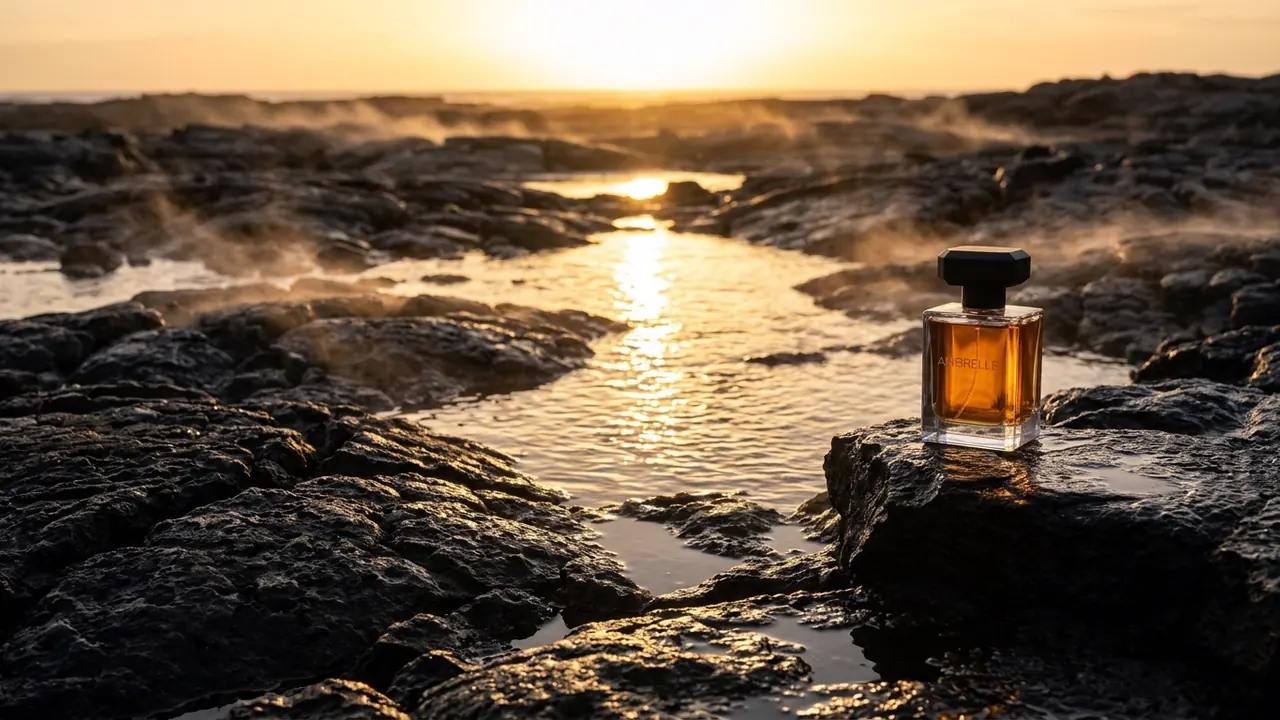 After one instruction
Steps
- In Claude, open Settings, then Connectors. Choose Add custom connector, paste https://vercanto.com/mcp, click Connect and sign in to Vercanto.
- Give Claude the photo: paste a public link, or ask for the upload page and drop the file into your Vercanto library.
- Confirm that the photo is yours or that everyone in it agreed.
- Say what changes and what must stay, for example: keep the bottle exactly as it is, new wide scene at sunset.
- Compare the result with the original and ask for another pass if you need one. Each pass is a new image at the same price.
Menu names change between app versions. Look for connectors, apps, integrations or MCP servers.
What to type
Use the perfume bottle from this photo exactly as it is. New photograph, 16:9: a wide shot of wet volcanic stone at golden hour, the bottle small on the right.
Updated
Without an assistant: on the site
You can do the same without Claude: open the Nano Banana 2 page on Vercanto. Its composer has a box for your request, slots for your files and the price of your settings; press Generate and the result is saved in your library.
Generating needs a Vercanto account with credits. The page asks you to sign up when you press Generate and keeps what you typed.
Good to know
- Several editing models take more than one image, so a product, a person and a setting can be combined in one picture.
- Say what must not change. “Keep the label and the cap as they are” works better than describing only the new scene.
- For a transparent background, ask for the background to be removed. That is a separate tool.
Questions
Can Claude edit images by itself?
No. Claude can look at an image, but changing one needs an image model. With Vercanto connected, Claude sends your photo and the instruction to an editing model.
Which models can edit a photo?
11 of the image models take input images, among them Nano Banana 2, Nano Banana Pro and FLUX Kontext Dev.
Does the rest of the photo stay the same?
Editing models keep what you do not mention as close as they can. For exact results, say what must stay.
What does one edit cost?
12 credits ($0.12) on Nano Banana 2, 21 credits ($0.21) on Nano Banana Pro and 4 credits ($0.04) on FLUX Kontext Dev. Each pass is a new image at that price.
Can Claude remove the background instead?
Yes, with a separate tool: ask Claude to remove the background and it returns a transparent PNG of the subject.
Can I do this without Claude?
Yes. Open the Nano Banana 2 page on Vercanto, type your request, add your files if the job needs them and press Generate. The price of your settings shows before you press, and the result is saved in your library.
Who owns what I make, and can I use it?
You keep the rights you have in what you upload and what you generate, subject to the terms of the model providers. You give us the permissions needed to store and process it for you. We do not use your content to train AI models. Uploading media or passing it to the service (as a file, a link or an asset id) means you confirm that you own it or have the consent of everyone who appears or is heard in it; a false confirmation is a violation of these terms.
Can I use what I make?
This is what the terms say about what you upload and what you generate:
You keep the rights you have in what you upload and what you generate, subject to the terms of the model providers. You give us the permissions needed to store and process it for you. We do not use your content to train AI models. Uploading media or passing it to the service (as a file, a link or an asset id) means you confirm that you own it or have the consent of everyone who appears or is heard in it; a false confirmation is a violation of these terms.